What goes in
250 coins
Ranked by market cap, stablecoins and thin-volume listings filtered out, refreshed every few minutes.
Crypto heatmap
Crypto heatmap — the whole market on one screen
The market in one glance, weighted by what actually matters.
Up to 250 coins, sized by market cap, coloured by the move. Read the crypto heatmap yourself, then
see why a list sorted by percent change is the wrong instrument.
What comes out
1 picture
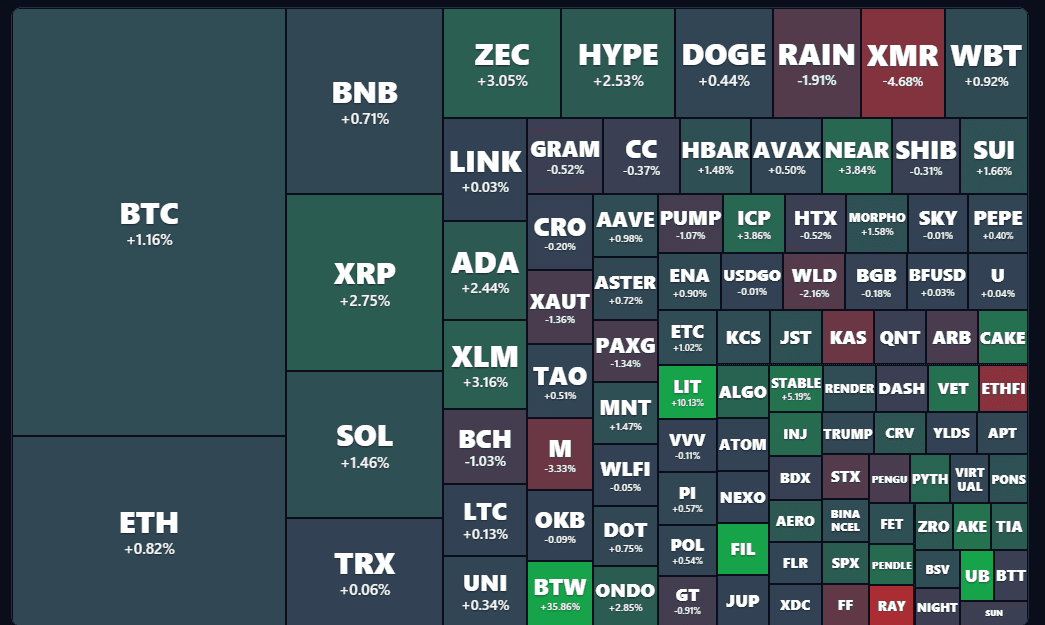
Tile area is size, tile colour is the 24h, 7d, 30d or 1y move, with the Fear and Greed Index beside it.
1 picture
Tile area is size, tile colour is the 24h, 7d, 30d or 1y move, with the Fear and Greed Index beside it.
Crypto Market Heatmap
Loading market data…
Light
Dark
Fear & Greed Index
–
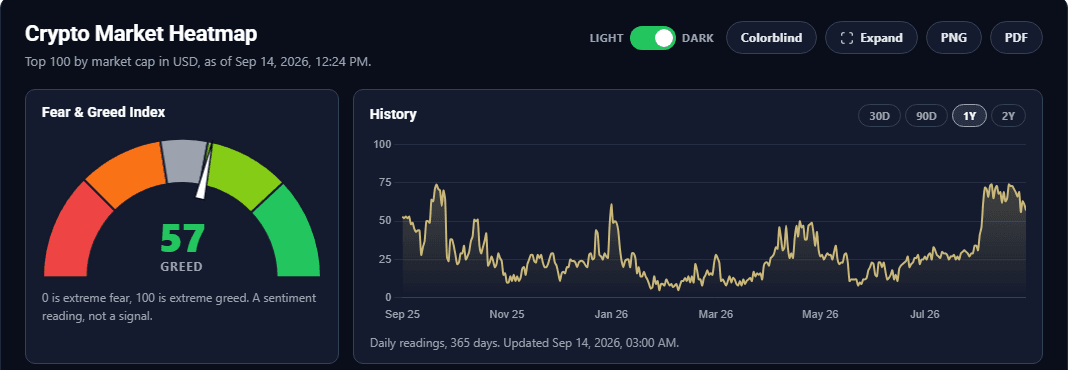
0 is extreme fear, 100 is extreme greed. A sentiment reading, not a signal.
History
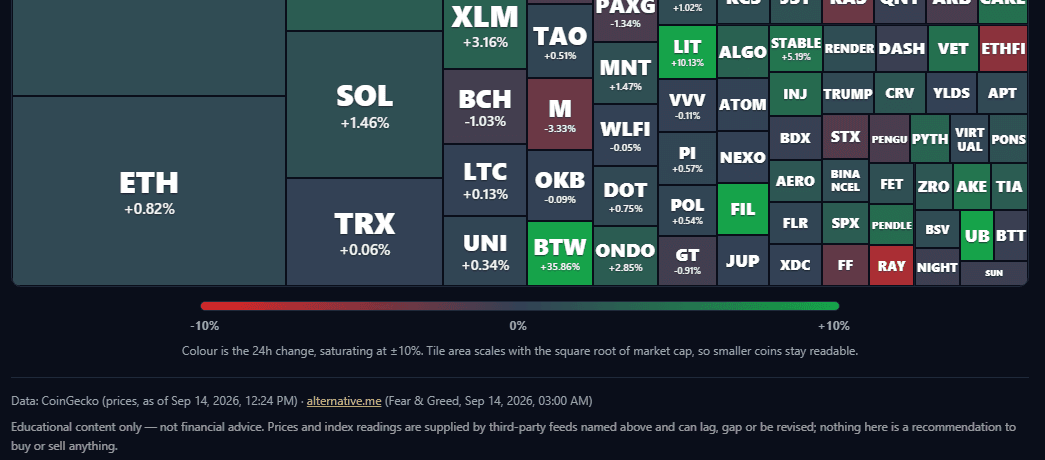
Colour is the 24h change, saturating at ±10%. Tile area scales with the square root of market cap, so smaller coins stay readable.
Educational content only — not financial advice. Prices and index readings are supplied by third-party feeds named above and can lag, gap or be revised; nothing here is a recommendation to buy or sell anything.
01 — Why a gainers list is the wrong instrument
A list sorted by percent change shows you the noise first.
Every exchange app has a “top movers” tab. It is the most looked-at screen in crypto and the least informative, because it ranks by the one thing that says nothing about size.
The version you usually get
A ranked list
A ranked list
Sorted by the day’s percent move. The top of it is whatever thin coin got squeezed overnight, and the assets that hold most of the money in the market are buried under it, unmoved and invisible.
What this is instead
Area and colour
Area and colour
Every tile’s area is its market cap, its colour is the move. A small coin up 40% is a small green square; the largest asset down 3% is a large red one. The picture weights the news the way the market does.
The reason this matters is not aesthetic. A gainers list is built to be exciting, and exciting is how a working professional ends up chasing a coin with a market cap smaller than a mid-sized apartment block. The crypto heatmap makes size the first thing you see, so the question “is this move happening where the money is, or at the edge?” is answered before you have read a single ticker.
Two things are stripped out before the crypto heatmap draws anything. Stablecoins are excluded by default, because a tile that is always grey at 0.01% tells you nothing and takes up room. And anything with less than about a million dollars of daily volume, or with “test” or “scam” in its name, is dropped, because a price with no trading behind it is not a price. You can switch the stablecoins back on with one toggle; the volume floor stays.
What a crypto heatmap is not, and it is worth saying before you scroll: it is not a signal. It has no score, no threshold, no alert. It shows what the market did over the window you chose, weighted honestly, and stops there. The Fear and Greed gauge beside the crypto heatmap is a sentiment reading, labelled as one, and is there because the two together answer “what does the market look like today” faster than either alone.
02 — The arithmetic
Two numbers per coin, one rule for each.
A crypto heatmap is only honest if you know what decides the size and the colour. Here is the whole of it. There is nothing proprietary in the method, which is the point.
Universe
IN
The top 10, 50, 100 or 250 coins by market cap, in your chosen currency.
USD, EUR, GBP, JPY, ILSStablecoins
OUT
Tether, USDC, DAI and the rest are removed unless you switch them on. A tile that is always grey is wasted area.
Thin and junk listings
OUT
Anything under about $1M of daily volume, anything named as a test or a scam, and duplicate tickers (the larger market cap stays).
Tile area
√
The square root of market cap, or of 24h volume if you size by volume.
weight = sqrt(market_cap)Tile colour
±
The percent change over the window, divided by the scale and clamped. Full red or full green at
±10% for 24h, ±20% for 7d, ±30% for 30d, ±100% for 1y.Missing window
n/a
If the data source does not supply a change for the window, the tile is hatched and labelled no data. It is never drawn as 0%.
The crypto heatmap
=
One picture of the market, sized by weight and coloured by move, refreshed every few minutes.
The square root is the part people ask about, so here is the reason. The largest coin is tens of thousands of times bigger than the 250th by market cap. Draw that linearly and one tile is the whole screen while the tail is a row of unreadable slivers. The square root compresses the range without changing the order: bigger is still bigger, every tile still carries its ticker, and the largest assets still dominate the picture the way they dominate the market.
The colour scale widens with the window for the same reason. A 5% day is a loud day; a 5% month is nothing. If the year view used the day view’s scale, every tile would be saturated and the picture would say nothing. The scale in use is printed under the crypto heatmap, so you always know what full red means.
One thing the crypto heatmap will not do is invent a number. If every data source is down, the last good reading is shown with its own timestamp and a stale label. If a source cannot supply the one-year change for a coin, that tile says so instead of pretending the coin was flat. A blank that is labelled is information. A zero that is really a blank is a lie.
03 — How it works
How to read the crypto heatmap in thirty seconds, then close it.
The crypto heatmap is a glance, not a screen to sit in front of. The data refreshes every few minutes, but the picture it paints changes over days, and that is the resolution worth reading it at.
01
Look at the big tiles first
The largest tiles are where the money is. If they are one colour, the market moved together and the small tiles are mostly following. If the large tiles are grey and the small ones are lit up, the day’s action is happening at the edge, which is a different kind of day.
02
Change the window before you draw a conclusion
Switch from 24 hours to 7 days, then 30 days. A red day inside a green month is a pullback. A red day inside a red month is a trend. The same tile tells a different story at each window, and the colour scale widens with it so the comparison is fair.
03
Size by volume when something looks wrong
Market cap is what a coin is worth on paper. Volume is what actually traded. A big tile that shrinks to nothing when you size by volume is a coin nobody is trading, whatever its price says. Switching between the two is the fastest sanity check on the crypto heatmap.
04
Read the gauge as a mood, not an instruction
The Fear and Greed Index beside the crypto heatmap is a published sentiment reading from 0 to 100, with its daily history underneath. Extreme readings are worth noticing and are not a signal on their own. They are useful precisely because the crypto heatmap next to them shows what the market did while people felt that way.
Every control
Free. No account, no email.
- Universe: top 10, 50, 100 or 250 by market cap
- Change window: 24 hours, 7 days, 30 days or 1 year
- Size by market cap or by 24-hour volume
- USD, EUR, GBP, JPY or ILS
- Stablecoins on or off
- Search by ticker or name; everything else dims
- Colourblind palette, remembered in your browser
- Expand to full width; export as PNG or PDF
What a tile tells you
Hover over it; a click or tap opens the coin
- Rank and full name
- Price in your currency
- Market cap and 24-hour volume
- The move over the window you have selected
- Whether it is a stablecoin
- Click or tap: the coin’s page on the data provider’s site, in a new tab
- A hatched tile means the source has no figure for that window
04 — Objections
What this crypto heatmap cannot do.
Listed here rather than buried, because a tool that only advertises its strengths is not a measuring instrument, it is an argument.
Objection
“Your numbers do not match my exchange.”
They will not, and no crypto heatmap’s do. The prices, ranks and change figures come from a public market-data provider — CoinGecko by default, with a fallback if it does not answer — and a provider’s price is an aggregate across many venues, not the last trade on yours. The source and its timestamp are printed under the crypto heatmap so you always know whose figure you are looking at.
Providers also disagree with each other and revise their own history. The crypto heatmap shows what the source currently publishes and does not adjust it. If a number matters enough to act on, check it at the venue you would act on.
Objection
“Market cap is a made-up number for half these coins.”
For a good part of the tail, yes. Market cap is circulating supply times price, and circulating supply is self-reported by the project for many smaller coins. A coin with a large cap and almost no volume can be a tile that looks important and is not.
That is why the size-by-volume switch exists and why it is one click away rather than a setting. Volume is what actually traded in the last day. A tile that is large by cap and vanishes by volume has told you something the cap alone never would.
Objection
“Is this going to tell me what to buy?”
No, and it is not built to. There is no score, no threshold, no alert and no ranking by anything except size. It reports what the market did over the window you chose and stops. The Fear and Greed gauge is a sentiment index published by a third party, shown here as a mood reading and labelled as one in the tool itself.
If you want the risk-first framework this site actually runs on, that lives in the weekly issue, in the market risk indicator and in the tools built for it. The crypto heatmap is a picture of the market, not a view on any coin in it.
Objection
“I opened it twice and got two different maps.”
Correct, and deliberately so. The crypto heatmap page itself carries no market data, so it can be served from cache instantly; your browser then asks the plugin for the current reading, and the plugin fetches upstream at most once every few minutes per currency. Two readers a minute apart can see two slightly different maps, and neither is wrong.
The one thing that will not happen is a silent substitute. If every source is down, the last good reading is shown with a stale label and its own timestamp. Nothing is smoothed, filled in or invented to keep the tiles coloured.
05 — Who this is for
A crypto heatmap for people who do not watch charts.
The crypto heatmap is the quickest tool on the site to read and the easiest to over-read. The crypto max pain chart and global net liquidity sit beside it for the parts of the picture a heatmap cannot show. It answers one question well and refuses the others.
Worth your time if
- You want to know what the crypto market did today, this week or this month in the time it takes to read this sentence.
- You already run a systematic plan and want the market picture as context, not as a trigger.
- You are tired of “top gainers” lists that put a coin nobody owns at the top and the assets everyone owns at the bottom.
- You want to see whether a move was broad or narrow — the whole market, or one corner of it — before you read a single headline about it.
- You check in once a week and then get on with your life.
Skip it if
- You want an entry signal. There is none here, and adding one would make the crypto heatmap worse.
- You want to find the next hundred-times coin. The tail is the smallest tiles on purpose, and the crypto heatmap is built to keep your eye off it.
- You trade intraday. The picture changes over days; a refresh every few minutes is not a tape.
- You want exchange-exact prices. These are provider aggregates, and they are labelled as such.
- You want the Fear and Greed number to tell you what to do. It tells you how people feel. That is all it has ever measured.
06 — Questions
What the crypto heatmap is, and what it is not.
Answered against what the crypto heatmap actually does, not against what would be convenient to claim.
What is a crypto heatmap?
A crypto heatmap is a single picture of the market in which every coin is a rectangle. The area of the rectangle is the coin’s size — its market cap, or its trading volume if you choose — and the colour is its price change over the window you pick: red for down, green for up, grey for flat. The layout is a treemap, so the rectangles pack the whole canvas with no gaps.
The point of the format is proportion. A list of percent changes treats a coin worth a few million dollars and the largest asset in the market as equals. A crypto heatmap does not: the move that happened where the money is takes up most of the screen, and the move at the edge takes up a corner.
How is the tile size calculated?
From the square root of market cap, not market cap itself. The largest coin is tens of thousands of times bigger than the two-hundred-and-fiftieth, and drawn linearly it would be the whole screen with the rest unreadable. The square root compresses that range without changing the order, so bigger is still bigger and every tile can carry its ticker.
Switch “Size by” to volume and the same square root is applied to the last 24 hours of trading instead. That view answers a different question — not what is a coin worth on paper, but what is actually changing hands.
What do the colours mean?
The percent change over the selected window, divided by a scale and clamped. For the 24-hour view the tile is fully red or fully green at a 10% move; anything between is a proportional blend. The scale widens with the window — 20% for a week, 30% for a month, 100% for a year — because a 5% day is a loud day and a 5% month is nothing, and one scale for both would make the longer views a wall of saturated tiles. The scale in use is printed under the crypto heatmap.
A hatched grey tile means the data source has no change figure for that coin over that window. It is shown as no data rather than as 0%, because a zero that is really a blank is a lie. A colourblind palette (orange and blue) is one click away and is remembered in your browser.
Where does the data come from, and how often does it update?
From a public market-data provider — CoinGecko by default, with CoinPaprika as the fallback if it does not answer. The source and the time of the reading are printed under the crypto heatmap. The Fear and Greed Index and its history come from alternative.me, which publishes one reading a day.
The plugin fetches upstream at most once every few minutes for each currency, and every visitor in that window sees the same reading. If every source is down, the last good reading is shown with a stale label and its own timestamp. Nothing is smoothed, carried forward without saying so, or invented.
Why are stablecoins missing, and why is the list shorter than 250?
Stablecoins are excluded by default because a tile that is always grey at a hundredth of a percent takes up area and says nothing. There is a checkbox to include them, and when you do they are marked as stablecoins in the tooltip.
Before anything is drawn, the list is also filtered: coins with under about a million dollars of daily volume are dropped, so are listings with “test” or “scam” in the name, and where two listings share a ticker only the larger one stays. The universe is the top 10, 50, 100 or 250 that survive those filters, so it can occasionally come up a few short of a round number. That is the filter working, not a gap in the data.
Is the Fear and Greed Index a buy or sell signal?
No. It is a published sentiment index from 0 (extreme fear) to 100 (extreme greed), built from things like volatility, volume, social activity and market dominance. It measures how people feel, not what prices will do. The tool labels it a sentiment reading and not a signal, and that label is not modesty, it is the accurate description.
It sits beside the crypto heatmap because the two together answer “what does the market look like today” faster than either alone: the map shows what prices did, the gauge shows how people felt while they did it. Nothing here is a recommendation to buy or sell anything. Educational content only, not financial advice.
Do I need an account, and is anything stored?
No account, no email and no sign-up. The crypto heatmap is free and there is no paid version of it; the other free tools are listed on one page. There is nothing to enter, because it reads public market data rather than anything about you.
The only thing kept in your browser is whether you switched on the colourblind palette. Your choice of universe, window, currency and sizing lives in the page for as long as it is open and is gone when you leave. Exporting a PNG or PDF happens in your browser; the image is not uploaded anywhere.