The toolbox

Tools for the decisions that actually move the number

Every one of these runs in your browser. No account, no email wall, nothing to install. They exist because the arithmetic behind a serious money decision is usually simple, and almost never actually done.

They are grouped by the question you are asking, not by category.

Plan and track

Whether the plan you are running can actually produce the outcome you have in mind, and what happens to it under stress.

NEW

Member Dashboard

The one tool on this page that needs an account, and the account is free. Import your Binance, KuCoin or Meitav files, or add trades by hand, and see every holding on one page, your money-weighted return, and how it compares with the S&P 500, gold or Bitcoin on the same deposits.

FREE

DCA Simulator

Run a dollar-cost-averaging plan against real price history across crypto, S&P 500 stocks and commodities, and see what the schedule actually produced rather than what it felt like.

FREE

Plan Gap

Solves your plan backward: the contribution your goal actually requires, against the one you are making today. Prices all three ways to close the difference.

FREE

Optionality Tracker

The retirement number funds the life you live now. There is an earlier number that funds the life you would accept, it arrives years sooner, and almost nobody has worked out where it sits.

FREE

Peer Benchmarking

Where you stand against people like you. Most tools stop at the rank; this one carries on to what that position actually funds, which is the part that matters.

FREE

Black Swan

Build your portfolio, then replay it through the crashes that actually happened. It cannot tell you what the next one holds, and it does not pretend to.

FREE

Spousal Sync

Where two people genuinely agree about money and where they do not. Most money arguments are two unspoken default settings meeting for the first time.

Before you spend

These price the alternative to a purchase. None of them is here to talk you out of anything — if it is worth it to you, it is worth it.

FREE

Time Value of Purchases

What a purchase costs once you count what the same money would have done instead. It prices the alternative and leaves the decision to you.

FREE

Opportunity Cost

Waiting for a better entry feels free. It is not: every month you wait, the money is not working. This prices the wait, risk-adjusted rather than best-case.

FREE

Rent vs Buy

Buying is not automatically the better deal and renting is not throwing money away. Which one wins turns on two numbers nobody knows in advance, so the tool shows you both.

FREE

Degree ROI

Tuition is the number everyone argues about and usually the smaller half of the bill. The larger half is the salary you did not earn while studying, and nobody invoices you for it.

FREE

Decay vs Appreciation

Most things start losing value the moment you own them. The money you could have invested does the opposite. Both lines, drawn on one chart.

Free up the cash

For money that is already leaving your account every month without being decided on again.

FREE

Subscription Vampire

Subscriptions are small on purpose — each one priced to sit just below the level where you would stop and think. This adds them up and runs the total forward.

FREE

Minimum Payment

A minimum payment is designed to keep you paying, not to get you out of debt. This runs the schedule month by month so you can see where the money goes.

The conditions underneath

Not what to buy, and not when. What the money supply behind every asset is actually doing, measured rather than narrated.

NEW

Global Net Liquidity

The combined balance sheets of the Fed, ECB, Bank of Japan, PBoC and Bank of England, net of the Treasury account and reverse repo, week by week — with Bitcoin, the S&P 500 and gold on the same chart so you can see how closely they actually track it.

NEW

Crypto Heatmap

Up to 250 coins on one screen, sized by market cap and coloured by the 24-hour, 7-day, 30-day or 1-year move, with the Fear and Greed Index beside it — so you can see whether a move happened where the money is or at the edge, before you read a headline about it.

NEW

Crypto Max Pain

Call and put open interest by strike for Bitcoin, Ethereum, Solana and XRP, summed across Deribit, Bybit and OKX in coin units, with the pain curve drawn through it — so you can see the strike where option holders are paid the least, and whether that minimum is a sharp trough or a flat floor.

Free · one page · it stays free

One page, no alerts

The Dynamic DCA Blueprint lays the deployment framework out on a single page. No dashboard to check, nothing to log into, and no notifications — which is the entire point of it.

Educational content only — not financial advice. Every tool here is a calculator, not a recommendation, and none of them knows anything about your circumstances.

Steps To The Wealth
01 — Which tool, for which question

Sixteen free tools, sorted by the question you are actually asking.

The list above is grouped by decision. This is the same list as a decision tree, because the most common way to misuse a set of tools is to open the wrong one and act on a number that was never about your question.

Step one

Is my plan enough?

Start with the savings goal calculator: it solves the plan backward and prices the three ways to close a gap. Then the financial independence calculator, which tells you which of seven rungs you stand on. The retirement savings by age benchmark says where that sits against households like yours.

Step two

Will it survive a crash?

The DCA simulator replays a recurring buy through real price history, and the portfolio stress test replays a whole allocation through nine crashes that happened. Neither forecasts. Both are the tools to open before a real fall rather than during one.

Step three

Should I spend this?

Five tools price the alternative to a purchase: the time value of money calculator, the opportunity cost calculator, the rent vs buy calculator, the degree ROI calculator and the depreciation calculator. None of them says no. They say what the other side of the trade costs.

Step four

What is the market doing?

Three tools measure conditions rather than decisions: global net liquidity, the crypto heatmap and crypto max pain. They are context for a plan you already run, and the tools most often mistaken for signals. They are not.

The two that are about the operator, not the money

The subscription cost calculator and the minimum payment calculator are the tools for money already leaving the account without being decided on again. The financial compatibility test is the one for two people who have never checked where their defaults diverge.

Every one of these tools runs in the browser with no account and no email wall, and every one prints its assumptions on the page. That is the rule the whole set is built to: a number you cannot check is a number you should not act on.
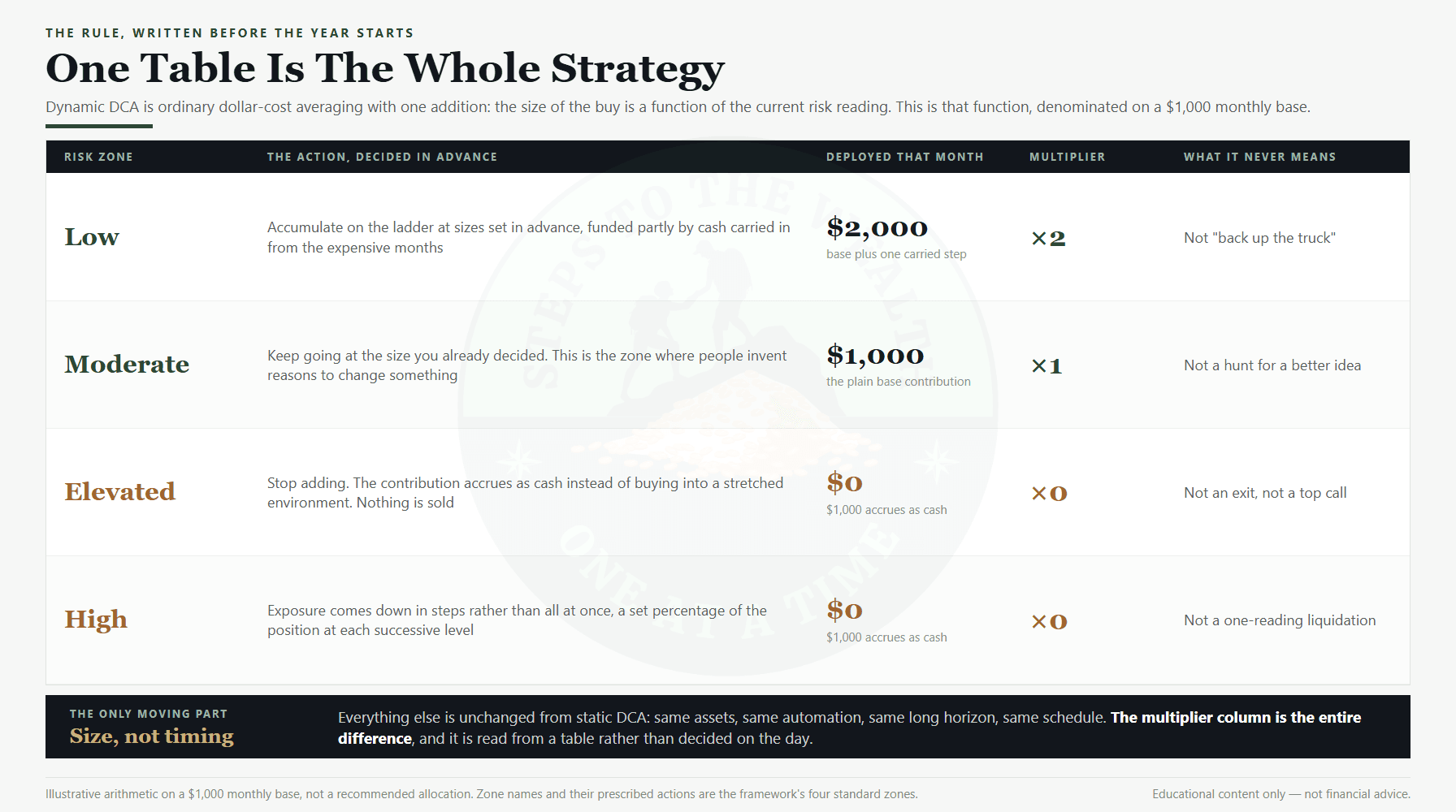
The Dynamic DCA rule table: four risk zones and the action each prescribes, the framework every tool on this page serves
The framework the tools serve: four risk zones, one action each. The tools price the decisions around it; the Sunday newsletter reads the zone.

02 — The arithmetic the tools share

One set of conventions, so the tools agree with each other.

A set of tools that used a different return assumption on every page would produce answers that could not be compared. These tools share their defaults, and the defaults are stated here once.

7% real is the house return. It is a disclosed rounding of a measured 6.74%: US large-cap total return of 10.02% a year from 1928 to 2025 (A. Damodaran, NYU Stern), deflated by CPI-U at 3.07%. It is one index, one currency, one span, rounded, and every tool that uses it says so in its own footer. It is not the historical average and no tool here calls it that.

Both sides are deflated. Where a tool sets a purchase against an investment, or a depreciating object against a growing balance, both are quoted in today’s money. Comparing a nominal number to a real one is the standard error in this category, and the tools are built so it cannot happen by default.

Nothing is invented to fill a gap. A missing price, a missing week of central-bank data or an exchange that did not answer is left blank and named. The tools would rather show you a labelled hole than a smoothed line, because a zero that is really a blank is a lie.

The lever that flatters us is the one to push first. On the tools where a generous return makes the site’s argument look better — renting, cancelling, not buying — the page says which way the default leans and tells you to lower it. A conclusion that only survives at the optimistic setting was never a conclusion.

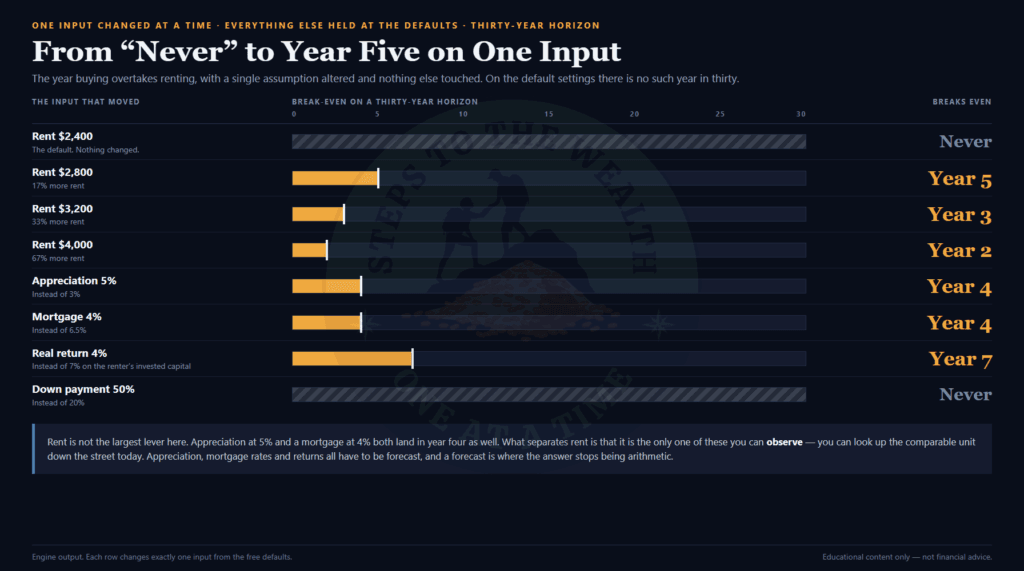
Break-even year from the rent vs buy tool with one input moved at a time, the sensitivity every tool here is built to expose
What a good tool does: one input moved at a time, and the answer shown moving with it. From the rent vs buy calculator.

03 — What the tools will not do

Calculators, not recommendations. The tools have limits, and they are listed.

A tool that only advertises its strengths is an argument with a number on it. Every tool here carries its own objections section; this is the short version that applies to all sixteen.

What they do

  • They show the working. Every figure on every tool page can be reproduced with a pen, and the arithmetic sections exist so you can check the tools rather than trust them.
  • They draw the counterfactual. A plan beside a lump sum, an object beside the money, a rank beside what it funds. A number with nothing to compare it to is not a result.
  • They stay free. The sixteen tools above are the working versions, not demonstrations. The Pro tiers add history, engines, expiries and exports; they take nothing away.
  • They pair with the free Sunday newsletter, which reads the risk zone the tools price decisions around.

What they do not do

  • They do not tell you what to buy. No tool on this page has an opinion about any asset, and adding one would make the tools worse.
  • They do not forecast. The tools replay what happened and price what a choice costs under a stated assumption; none of them knows what happens next.
  • They do not know your circumstances. Tax, healthcare, a pension, a paid-off house and everything else that changes what you need are absent from every one of these tools.
  • They are not financial advice. Every tool is educational, and every tool page says so. Educational content only — not financial advice.
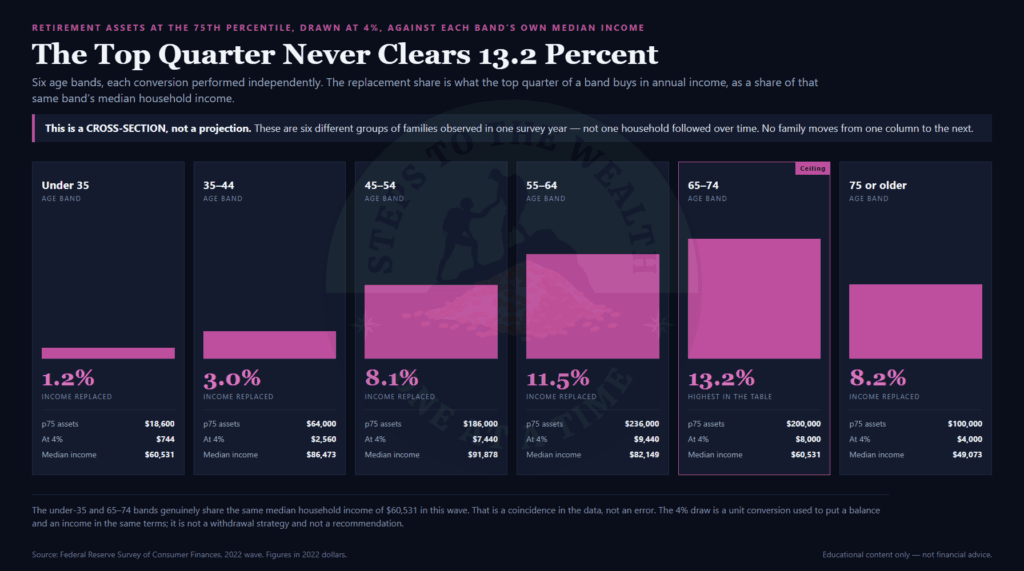
Retirement savings by age converted into replacement income, the second number most tools stop before
The second number most tools stop before: a rank converted into what it actually funds. From the retirement savings by age benchmark.

04 — Questions

What people ask about the tools.

Answered against what the tools actually do, not against what would be convenient to claim.

Are the tools really free?

Yes. All sixteen run in your browser with no account, no email wall and nothing to install, and each one is the working tool rather than a preview. Where a Pro tier exists it is a separate, stated purchase that adds history, engines or exports, and the free version is never cut down to make room for it.

Two of the sixteen record something: the DCA simulator writes a row per run for usage counting, and the tools that say nothing is stored say so because it is true of them.

Which tool should I start with?

The one attached to the decision you are actually facing this week. If there is no decision this week, start with the savings goal calculator, because whether the plan you are running can produce the outcome you have in mind is the question underneath every other one.

If you want the framework before the tools, the Dynamic DCA Blueprint is one page and free with the newsletter, and the tools make more sense once you have read it.

Do the tools give buy or sell signals?

No. Three of them measure market conditions — liquidity, the heatmap, max pain — and none of those is a signal, a score or a threshold. The rest price decisions: what a purchase costs, what a plan produces, what a crash would have done. None of them says act.

The risk reading that the framework acts on lives in the Sunday newsletter, not in the tools.

Why do all the tools use 7% as the return?

So that their answers can be compared. 7% real is a disclosed rounding of a measured 6.74% — US large-cap total return deflated by inflation over 1928 to 2025 — and every tool that uses it lets you change it. A set of tools that each picked its own rate would produce answers that disagree for no reason.

It is not a forecast. It is a stated assumption, and on the tools where it flatters the site’s argument the page tells you to lower it and see whether the conclusion survives.

Is anything I enter into the tools stored?

On most of them, nothing. Figures are sent to this site to be calculated and the answer comes straight back; nothing is written to a database or passed to anyone. Several tools run entirely in the page and send nothing at all. The DCA simulator is the exception, and it says so on its page: each run is logged for usage counting, with no name or email attached.

The only thing any tool keeps in your browser is a preference such as dark mode or a colourblind palette.

What is the difference between the free tools and the Pro tiers?

Scope, never accuracy. DCA Simulator Pro opens all 816 assets and seven more engines. Global Net Liquidity Pro adds roughly thirty years of history, five macro overlays, the table and exports. Crypto Max Pain Pro opens every listed expiry beyond thirty days, the per-strike table and exports. In every case the free tool runs the same arithmetic on the same sources.

Each Pro page says what the $49 or the $9 buys and, just as plainly, when to keep the money. If the free version already answers the question, it answers it.

How often are the tools updated, and who builds them?

The tools are built and maintained here, one at a time, and each is launched with an article that works its arithmetic through in the open. The market-condition tools refresh on their own cadence — every few minutes for the heatmap, every ten minutes for max pain, weekly for liquidity — and the calculators change only when a default or a data source changes, which their pages record.

New tools are announced in the Sunday newsletter and added to this page. Nothing here is a demonstration of a product elsewhere; the tools are the product.

Are the tools financial advice?

No. They are calculators and measurements. They price the choices you describe, replay history you choose, and show their working, and they know nothing about your circumstances. Every decision remains yours.

Everything on this page and on every tool page is educational. Educational content only — not financial advice.